Table of Contents
BitMap
A BitMap object is a rectangle of pixels, each with its own color. It is made by BitMap.New(), colored pixel by pixel with BitMap.Pixel(), and written to a bmp file with BitMap.Save(). A bitmap can be put on the page of a Graphics object with Graphics.Add(pl, b) or pl.Add(b), see Graphics.Add(), for example as a color map, a picture or a background, and is then written in the svg and PostScript files of that page.
Pixels and colors
A bitmap of NX by NY pixels has NX columns and NY rows. The pixel (i, j) is in column i, counted from 1 at the left, and row j, counted from 1 at the top. Each pixel has a color 0xAARRGGBB, with AA the transparency (00 opaque, FF fully transparent), as everywhere in Graphics (see colors). Through a transparent pixel one sees what lies below the bitmap.
On a page
On a page a bitmap fills a rectangle, set by the options of BitMap.New as fractions of the width and of the height of the page; by default the whole page. The pixels are stretched to fill the rectangle, so the number of pixels does not depend on the size on the page, and the pixels need not be square. A web browser smooths between the pixels when it shows a bitmap enlarged. Graphics.Add copies the bitmap: changing the bitmap afterwards does not change the page. Within one layer of a page the bitmaps are drawn first, below the lines, curves and texts; a bitmap added later is drawn on top of one added before.
Graphics.Add can also make a bitmap directly on a page, from a table of pixels or from matrices and a color function.
The size and the pixels of a BitMap object can not be read from the object itself; print(b) writes BitMap.
Example
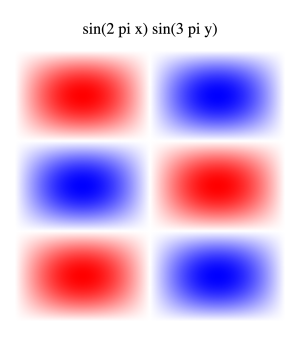
A standing wave of a square drum, $\sin(2\pi x) \sin(3\pi y)$, as a bitmap of 300 by 300 pixels, written as a bmp file and put on a page with a title.
Input
- Example.Quanty
-- a standing wave of a square drum, sin(2 pi x) sin(3 pi y) with x and y from 0 to 1,
-- as a bitmap of 300 by 300 pixels: positive red, negative blue, zero white.
-- On a page it fills the rectangle from (0.05, 0.05) to (0.95, 0.85), fractions of the page
N = 300
b = BitMap.New(N, N, {{"Canvas.Origin.X",0.05}, {"Canvas.Origin.Y",0.05}, {"Canvas.Size.X",0.9}, {"Canvas.Size.Y",0.8}})
for i = 1, N do
  for j = 1, N do
    local x = (i-0.5)/N          -- column i, counted from the left
    local y = 1 - (j-0.5)/N      -- row j, counted from the top
    local f = math.sin(2*Pi*x) * math.sin(3*Pi*y)
    local c = math.floor(255*(1-math.abs(f)) + 0.5)
    if f > 0 then
      BitMap.Pixel(b, i, j, 0xFF0000 + 0x000101*c)   -- from white (f = 0) to red (f = 1)
    else
      BitMap.Pixel(b, i, j, 0x0000FF + 0x010100*c)   -- from white (f = 0) to blue (f = -1)
    end
  end
end
print(b)

-- the bitmap as a file of its own
BitMap.Save(b, "Drum.bmp")

-- the bitmap on a page of 160 mm by 180 mm, with a title above it
pl = Graphics.New()
pl.SizeX = 160
pl.SizeY = 180
pl.Add(b)
pl.Add("sin(2 pi x) sin(3 pi y)", 0.5, 0.9, {{"Size",0.05}, {"Alignment","c"}})
file = io.open("Drum.svg", "w")
file:write(Graphics.ToSVG(pl, {{"RelativeSize",true}}))
file:close()
Result
BitMap
The script writes Drum.bmp and Drum.svg. The svg file shows the page: